Legacy application slowing employees down and impeding communication.
A decade old process, a legacy application and a "new" 7-year old application were slowing employees down and impeding compilation of reports. We identified areas for improvement in the existing process and ways to incorporate those improvements in the new custom application.
The frame.
Where we began and who was affected.
Teams were using an outdated application which had multiple issues that impacted productivity as described below:
- Users often experienced issues syncing data after entry, especially when they did not have a high speed internet connection. issue was particularly difficult for those who traveled to areas of the world where high speed internet was not always available.
- Copy and paste was not always available since some clients provided data on paper requiring manual data entry.
- Lack of proper validation created inconsistencies in the data. Additionally, terminology for tasks was not standardized creating confusion both for users and analysts.
- Interface was not tailored to the role of the user creating a cluttered experience and making it difficult to navigate.
These pain points permeated every aspect of the process. Team members spent excessive time on data entry and workarounds. Reports were difficult to create. The data analyst couldn't bulk-export or import data because it needed scrubbing due to inconsistencies. Employees would need to be retrained on the nuances of how each team operates when transferring roles.
"My dream is for reports to be automatically created. I do so much copying and pasting from one system to another." Team lead
Who I talked to.
I interviewed twelve people across three offices — a mix of those in the field, office staff, and the analysts trying to make sense of the data.
From there, four personas emerged.

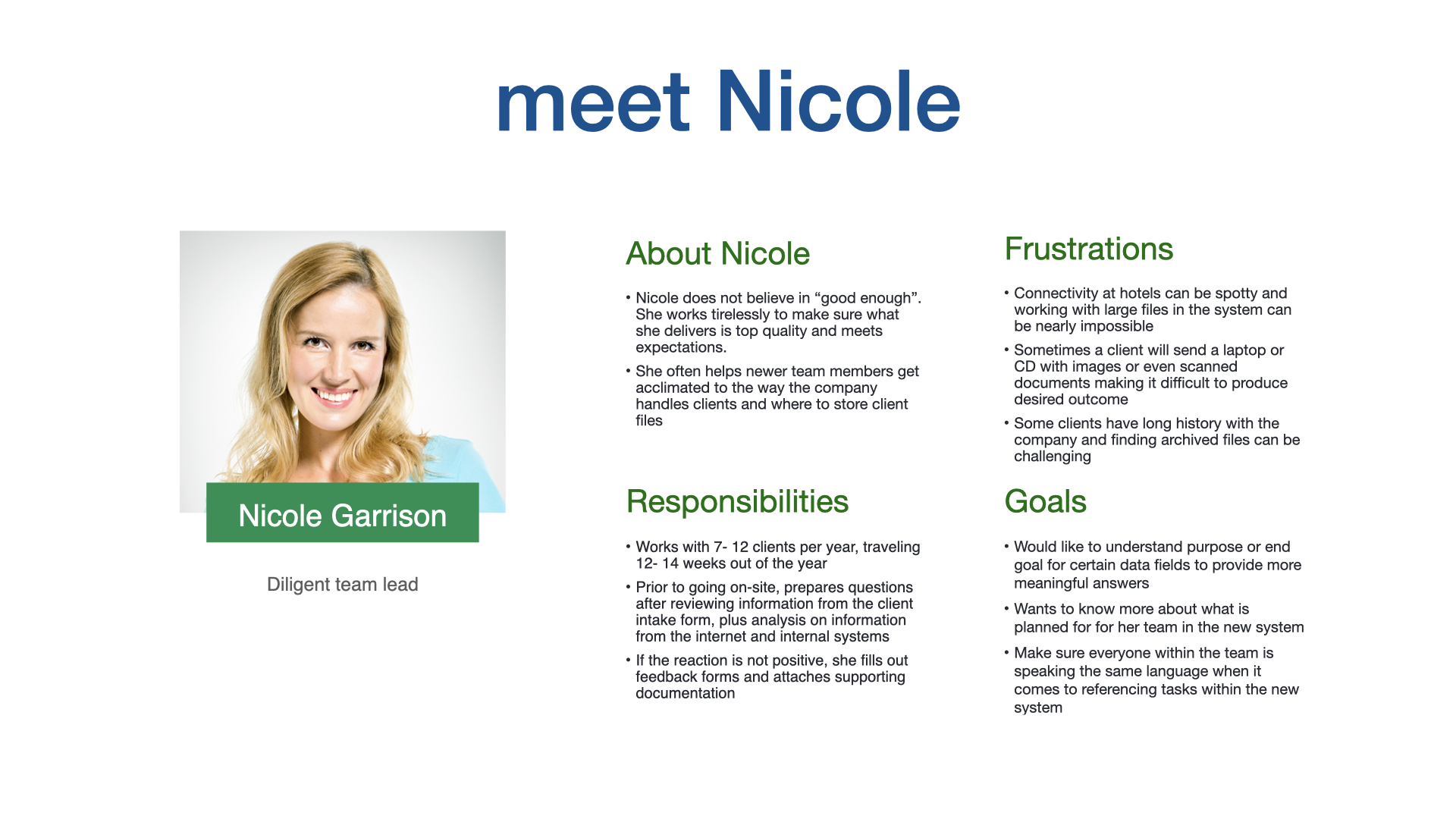
The Team Lead
Travels often, manages remote field staffTravels often to areas where hotels and sometimes clients do not have high speed internet. Finds it takes her team a long time to enter data not only due to the internet connectivity issue but some clients provide data on printed paper instead of electronically. Then she and her team need to manually enter the data into the system which makes it take double the time. In addition, some of her clients have been with the company for a long time and finding archived information for comparison is tedious.

The Small Client Specialist
Manages 300+ active client filesHas to enter data for 300+ files sometimes for clients manually. This is time consuming and frustrating when the system crashes due to lack of memory on his laptop to run it. His work is often put on hold for extended periods as he waits for responses from clients. He finds it hard to go back to this work after a period of time to “get back into the swing of things” and remember where he left off. Because of this, sometimes his client load overlaps and he finds that he is “context switching” from client to client making him less productive.

The Documentation Guru
Owns the report pipeline to leadershipFinds there is no consistency in how people enter data because of the lack of proper frontline validation and cross checking between legacy system and the “new” system which is 7 years old itself. Team members sometimes pre-load dates and because of the way the system was coded this messes up her reports to management. Because of the massive amounts of manual entry, discrepancies occur and that makes her job more difficult.

The Data Analyst
Reporting and cross-system data mappingCannot bulk download data from the system which makes reporting time consuming and nearly impossible. Mapping data points between systems is hard due to inconsistent naming conventions and data types. Versioning is not consistent among documents either making it hard to know which has the latest data.
What we found.
These are the key insights from research that shaped every recommendation that came after.
Lack of proper validation and data entry consistency created systemic issues.
Users couldn't trust the data or agree on how it should be handled. We needed to establish common terminology and processes for cross-functional teams in addition to strengthening data validation on the new system.
Connectivity was a design constraint and needed to be addressed.
Field staff spent weeks at a time on networks the application could not handle. Creating offline functionality and later synchronization would greatly improve productivity and the user experience.
Process and terminology standardization was lacking among teams.
Teams had different interpretations of how data should be entered and managed because training varied by team. Some users were unclear about the purpose behind certain data fields.
Where we landed.
Recommendations went into the development team's backlog as the foundation for the COTS replacement they were already implementing. Some of the items were implemented, while others remained backlogged (but may have been implemented since my departure).
Establish a shared data dictionary
So data could be stored and referenced consistently across teams and systems. Pulled the analyst out of perpetual translation mode.
Consolidate to one data source
So all systems were reading from the same truth, eliminating the silent versioning conflicts that cost the documentation team most of their week.
Common terminology & cross-functional training
Process and language alignment, paired with training so the new dictionary actually got used. Required a behavior change as much as a system change.
OCR for paper intake
So manual re-entry could be eliminated wherever clients still handed over paper. Could save hours per week.
Offline-friendly interface
Treat poor connectivity as an expected operating mode. Provide ability for users to work offline and sync changes when connectivity was available.
Role-based dashboards
What the Team Lead sees on login is not what the Data Analyst sees. Tailoring the entry point cut average time-to-first-task across all four personas.
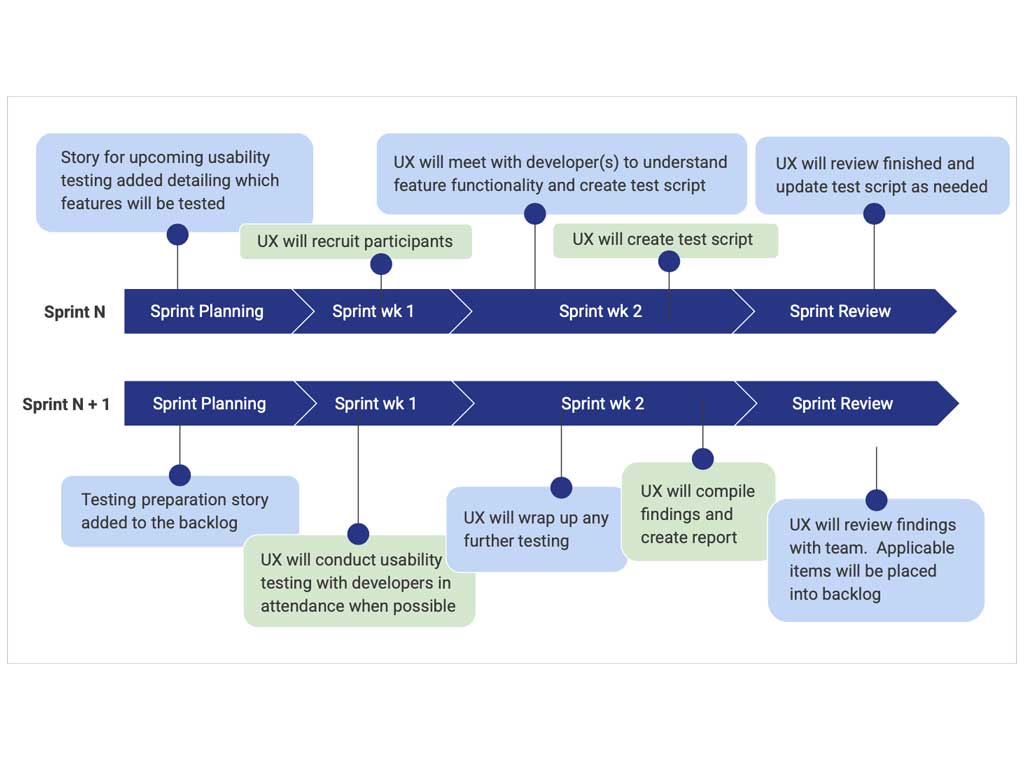
Incorporate usability testing into sprint cycles
Additionally, I recommended we integrate usability testing into our sprint cycles to ensure we were building a system that was user-friendly and accessible.
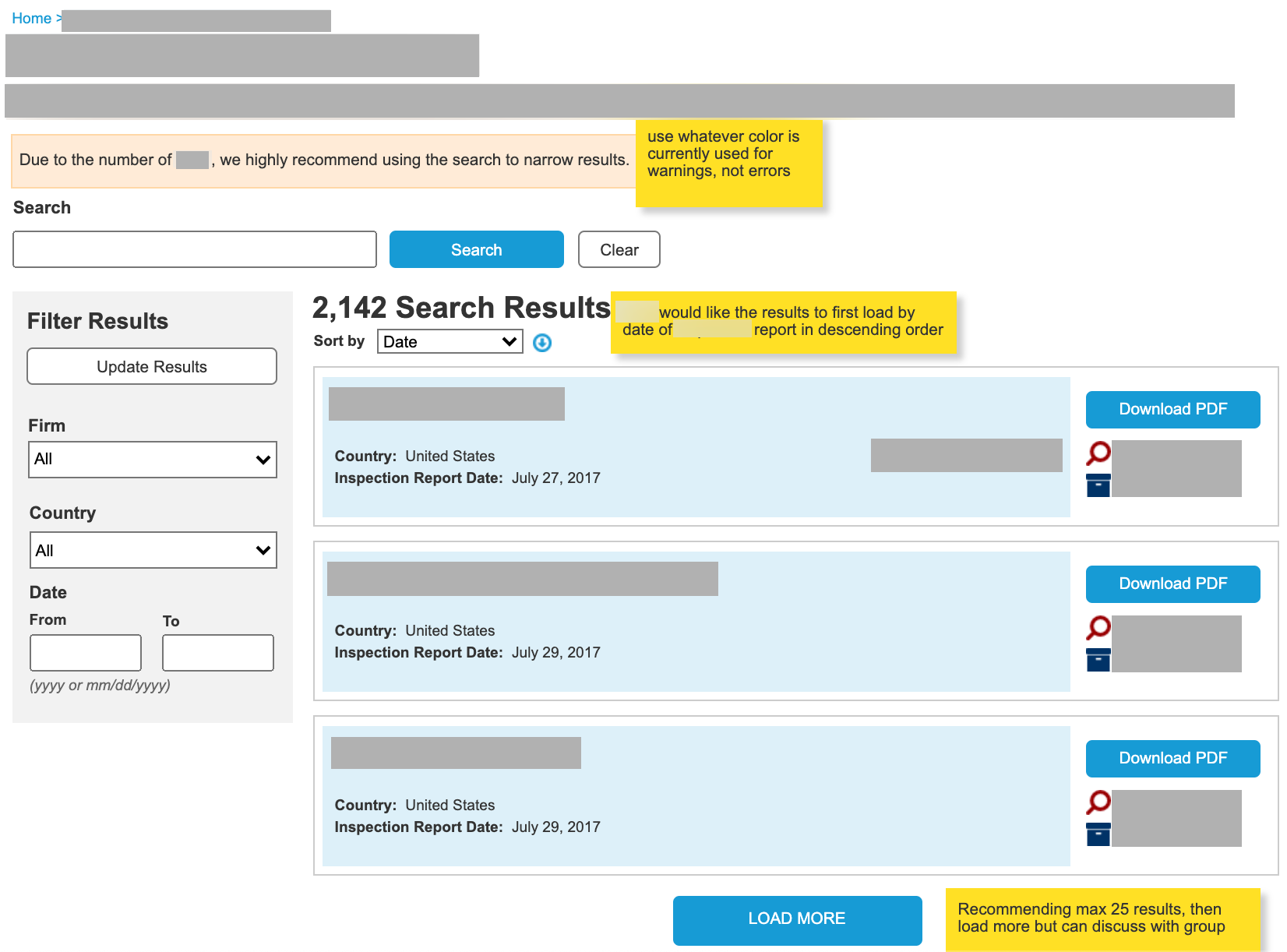
Improve search for previous findings
In a related effort, we improved the search on the internal portal to help users find relevant findings which may help them understand precendent for the work they were doing.
What I made.
These are sanitized recreations of the originals, which are under NDA.
What changed.
No specific numbers I'm able to share, but the qualitative signals from leadership and the field were consistent.
Six of eight recommendations were accepted and threaded into the COTS implementation.
Early adopters reported being able to complete their data entry tasks more efficiently and with less frustration.
Project Manager saw the value in the usability testing insights and prioritized them accordingly, creating a pool of testing candidates we could rotate each sprint cycle.
Development team previously not involved in user research were integrated into the testing process so they could see the research findings firsthand.
My role.
UX lead on this engagement — partnered with another UX designer, the project owner, development lead and a small development team.
What I did
- Conducted twelve stakeholder interviews across three offices
- Built four research personas, used by the dev team for empathy and prioritization
- Translated insights into a backlog of recommendations
- Designed the search wireframe for intranet portal to be used in conjunction with new tool
- Partnered with the project owner to weave user testing into sprint cadence
- Facilitated usability testing sessions and synthesized findings for the team
What the team did
- Implemented the COTS replacement product on the dev side
- Owned ongoing change management with the field offices
- Ran post-sprint usability sessions which I helped structure
